Compile Option Optimizer
Compile Option Optimizer generates multiple compile option candidates for one model Artifact, validates each trial with compile and evaluation, and selects the best NPU artifact for the given dataset and environment.
Prerequisites
- A Model Version and original Artifact must exist.
- A Ready DatasetVersion and Evaluation Criteria must exist.
- Supported device: RNGD.
Create an Optimizer Run
From the Model Version detail page's Optimizer tab, click Optimizer Run 생성.
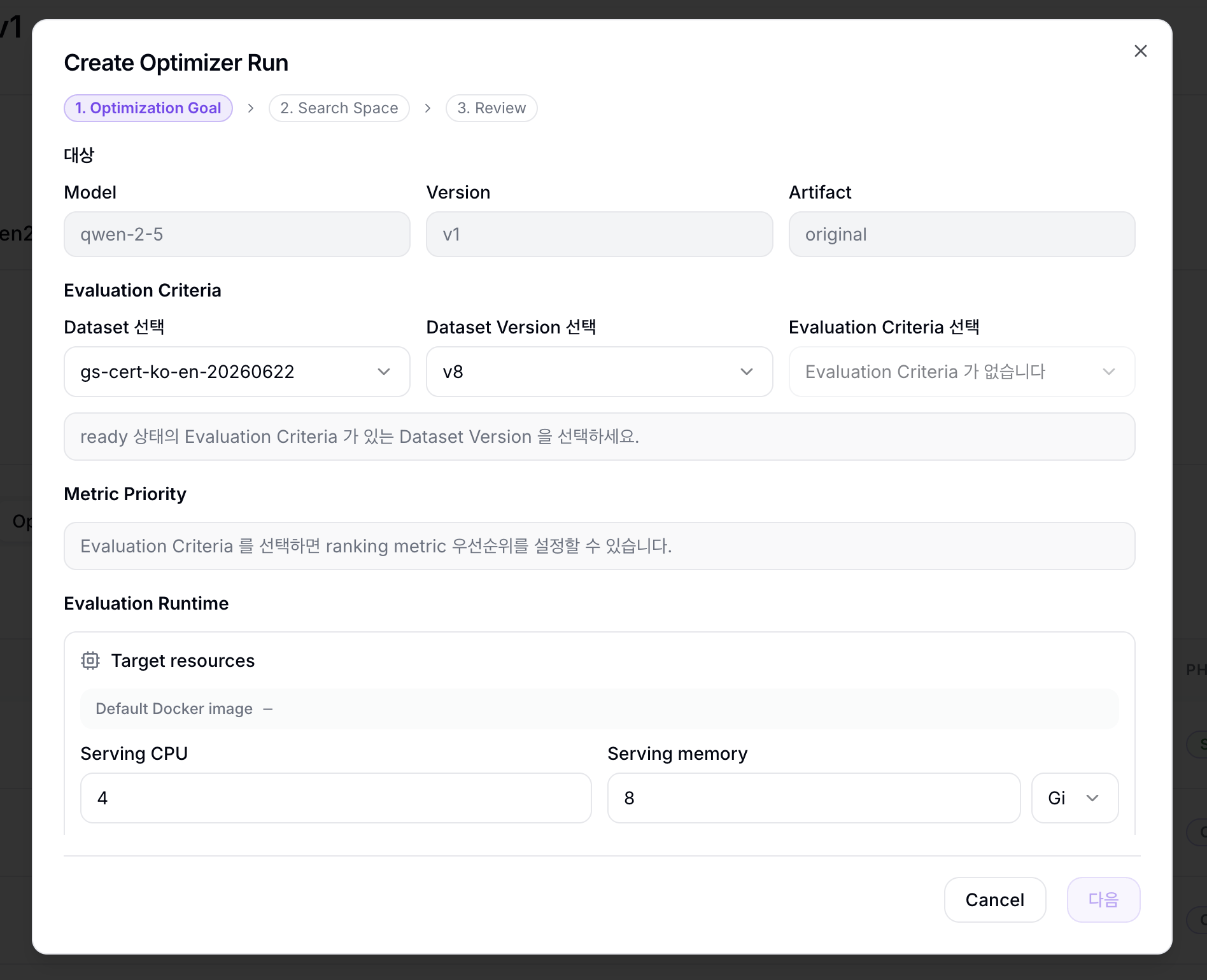
The creation wizard has three steps.
1. Optimization Goal
대상
| Item | Description |
|---|---|
| Model / Version / Artifact | Confirms the current Model Version and original Artifact to optimize. |
Evaluation Criteria
| Field | Description |
|---|---|
| Dataset 선택 | Dataset used for evaluation. |
| Dataset Version 선택 | Ready Dataset Version that has Evaluation Criteria. |
| Evaluation Criteria 선택 | Evaluation Criteria used to evaluate trials. |
| Criteria details | Shows the selected Criteria's result metrics, Field mapping, and prompt template. |
Metric Priority
| Field | Description |
|---|---|
| Primary | First metric used to choose the best trial. |
| Sort direction | Whether the metric is compared in ascending or descending order. |
| Tie-breakers | Collapsed section for secondary metrics applied in order when trials tie. |
Evaluation Runtime
| Section | Description |
|---|---|
| Default Docker image | Default runner image from the selected Evaluation Criteria. |
| Target resources | Configure Serving CPU, Serving memory, Serving accelerator count, and parallel evaluation count. |
| Runner overrides | Collapsed section for optional Container image, Limit, Batch size, concurrency, and few-shot count overrides. |
2. Search Space
Search Space defines the compile candidate range.
Workload preset
| Field | Description |
|---|---|
| Prompt 길이 | Choose 짧음 ~512 tokens, 보통 ~2K tokens, or 긴 입력 ~8K tokens. |
| 동시 요청 수 | Choose 1, 4, 8, or 16. |
The preset fills initial candidate values. Actual trials are generated from the Compile candidates and Bucket candidate sets values below.
파생 워크로드 값
| Field | Description |
|---|---|
| Prompt P50 / Prompt P95 | Target prompt length values for optimization. |
| Concurrency | Target concurrency for optimization. |
| Max Context | Maximum target context length for optimization. |
Derived workload values are reference values for the workload profile. Editing them does not recalculate the compile candidate list. To change candidate generation, edit Compile candidates or Bucket candidate sets.
Compile candidates
| Field | Description |
|---|---|
| Tensor Parallel | Comma-separated TP candidates, such as 4,8 |
| Pipeline Parallel | Comma-separated PP candidates, such as 1 |
| Max Seq Len | Comma-separated max sequence length candidates. RNGD currently accepts values up to 8192. |
| 병렬 compile 수 | Number of trials to run concurrently during compile. |
| Total Trials | Number of trials generated by the current candidate combination. |
Bucket candidate sets
| Field | Description |
|---|---|
| Prefill Buckets | Prefill-stage bucket candidate sets in batchxseq format. |
| Decode Buckets | Decode-stage bucket candidate sets in batchxseq format. |
Separate buckets in one set with commas. Separate multiple sets with semicolons or new lines. Prefill/decode bucket set combinations that cannot cover a Max Seq Len candidate are excluded from trial candidates.
The optimizer computes trial count as TP x PP x MaxSeqLen x PrefillSet x DecodeSet.
Execution example
| Field | Starting value | Why |
|---|---|---|
| Tensor Parallel | 4 or the same TP as the current artifact | Reduces compile failure risk. |
| Pipeline Parallel | 1 | Most first runs do not need multiple PP candidates. |
| Max Seq Len | One value matching the current artifact | Prevents trial count explosion. |
| Prefill/Decode Bucket candidate sets | 1-2 sets filled by the UI preset | Expand gradually after you see the result. |
| Parallel compiles/evaluations | 1 | Avoids cluster resource and accelerator shortage failures. |
Example: TP 2 values, PP 1 value, Max Seq Len 2 values, and 3 Prefill/Decode sets each create up to 36 trials. The actual trial count excludes bucket set combinations that cannot cover the Max Seq Len candidate.
Use Optimizer when you have a target dataset and want to compare metrics across multiple artifacts to choose the best artifact for your purpose. If you only want to compile one candidate once, use Compile.
RNGD compile currently allows Max Context Length up to 8192. Set Max Seq Len candidates within that limit.
3. Review
In Review, confirm the summary and detailed settings, then click 실행.
Summary
| Section | Description |
|---|---|
| 실행 대상 | Summarizes the Model Version, Artifact, and Dataset. |
| Best trial 선정 기준 | Summarizes the Primary metric and tie-breaker rule. |
| 실행 규모 | Summarizes trial count plus accelerator, CPU, and memory values. |
Detailed settings
| Section | Description |
|---|---|
| 대상 및 Evaluation | Confirms Model Version, Artifact, Dataset, Dataset Version, Evaluation Criteria, and Metric Priority. |
| Runtime resources | Confirms Serving CPU, Serving memory, Serving accelerator count, Image, Limit, Batch size, Num concurrent, Num fewshot, and parallel evaluation count. |
| Search space | Confirms Tensor Parallel, Pipeline Parallel, Max Seq Len, Prefill Buckets, Decode Buckets, parallel compile count, and Total Trials. |
| Workload profile | Confirms Prompt P50, Prompt P95, Concurrency, and Max Context. |
Execution Flow
When you create a run, Optimizer creates trials for each search-space combination. Each trial runs NPU compile, then runs evaluation with the generated artifact.
After successful trials report quality/runtime metrics, Metric Priority determines the ranking and best trial. Compile and evaluation use separate queues, with concurrency limited by the parallel compile and parallel evaluation values entered during creation.
Run List
The Optimizer list shows run status and best trial.
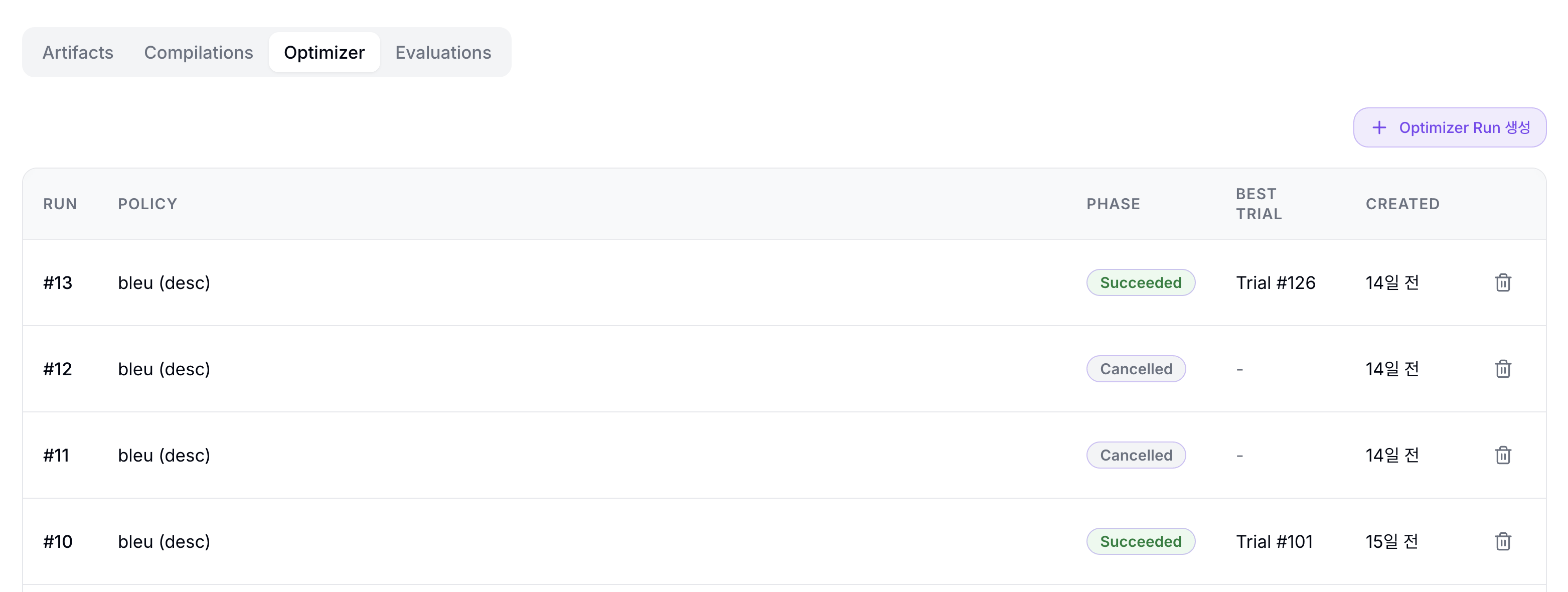
| Column | Description |
|---|---|
| RUN | Optimizer Run ID |
| POLICY | Metric ranking policy |
| PHASE | Pending, Running, Succeeded, Failed, Cancelled |
| BEST TRIAL | Current best trial |
| CREATED | Creation time |
| Stop/Delete | A delete icon is shown. Pending or Running runs also show the circle-stop icon. |
Pending or Running runs can be stopped with the circle-stop icon. Stopping a run stops queued or running trials and requests cancellation of related compile/evaluation work.
Click a run row to open the Optimizer Run detail page.
Run Detail and Trial Ranking
The Run detail page shows Run Summary, Best Trial, Result Readiness, and the Trials list.
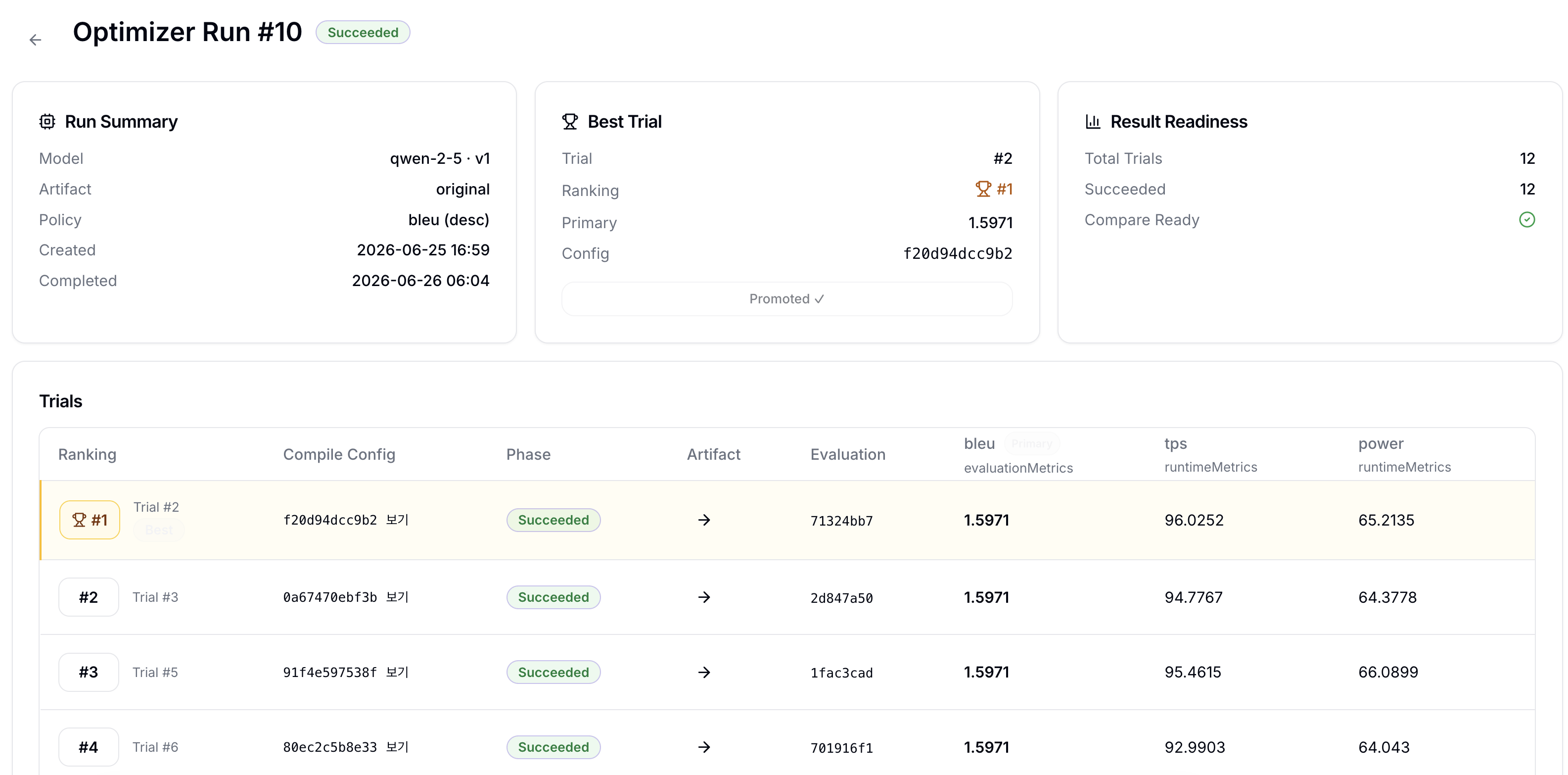
| Section | Description |
|---|---|
| Run Summary | Shows Model, Version, Artifact, Policy, Created, and Completed. |
| Best Trial | Shows the selected best trial's Trial number, Ranking, Primary metric, and Config hash. |
| Result Readiness | Shows total trial count, succeeded trial count, and compare readiness. |
| Trials | Shows Ranking, Compile Config, Phase, Artifact, Evaluation, and metric values for each trial. |
When a run is Pending or Running, the detail page header shows Cancel run to request cancellation.
If 보기 is shown in the Compile Config column, it opens the related compile pipeline detail. The Evaluation column link opens the EvaluationRun detail created by that trial.
Inspect and Promote Artifacts
Successful trials with artifacts show an arrow icon in the Artifact column. Click it to open the Trial Artifact Drawer.
The drawer shows artifact metadata such as Platform, TP × PP, MaxSeqLen, and From.
Trial artifacts can already be connected to Model Registry artifacts, but Optimizer still tracks promote state separately. If Promote to Artifact is shown, you can mark that trial as promoted; already promoted trials show Promoted ✓.
Failure Handling
- Too many trials: Check the trial count in the Review step and reduce TP, MaxSeqLen, or bucket candidates.
- Compile failed: Open the compile pipeline detail and check compiler logs and artifact platform.
- Evaluation failed: Start with Job logs and Target logs in the EvaluationRun detail page.
- Not enough resources: Lower parallel compiles/evaluations to
1, reduce target accelerator count or memory, or check cluster capacity. - Missing metrics: Confirm that the Evaluation Criteria points at the intended input/target fields for the DatasetVersion.