Users
Administrators can search the user list, browse it page by page, grant or revoke administrator privileges, and delete users from the dashboard UI.
This menu appears only for accounts that have the nufi-admin role. The default administrator account is created automatically in the Keycloak realm during system installation, and the default login is admin / nufiadmin. Set the KEYCLOAK_ADMIN_PASSWORD environment variable before installation to change the default password.
Prerequisites
- NuFi must be installed and the Keycloak integration must be complete.
- You must be logged in as an account granted the
nufi-adminrole.
User list
In the left sidebar, click Admin > Users.
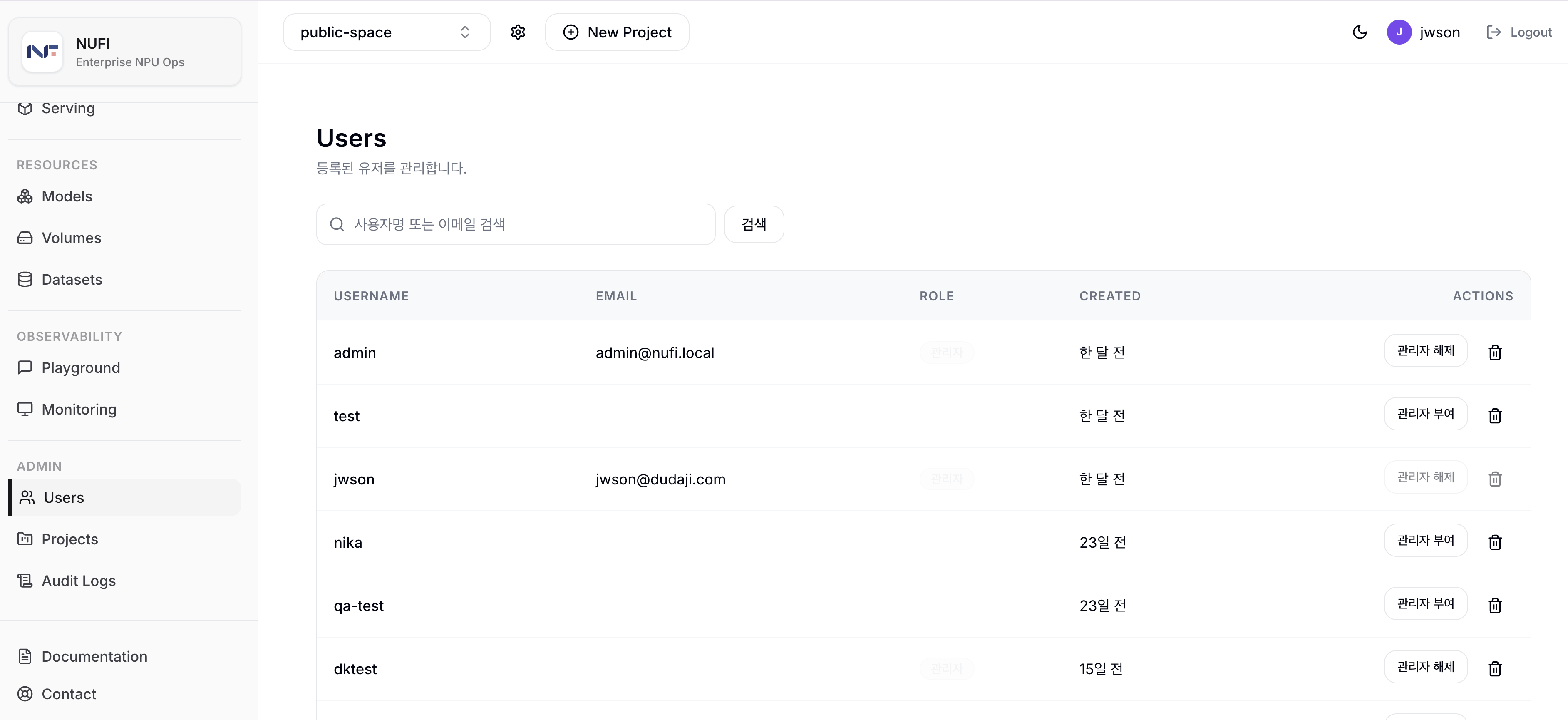
Enter a username or email address in the search field and click Search to show matching users. The list is loaded 20 users per page, and you can move between pages with the pagination controls at the bottom.
Columns
| Column | Description |
|---|---|
| Username | User login ID |
| User email address | |
| Role | Shows an admin badge for administrators (blank for regular users) |
| Created | Account creation time |
Row actions
Use the Actions column in each user row to run these actions.
| Action | Description |
|---|---|
| Grant admin / Revoke admin | Grants or removes the nufi-admin role for the user. |
| Delete | Deletes the user. A confirmation dialog appears before deletion. |
The default admin account (admin) cannot be deleted or have its role changed, and you cannot delete your own account or revoke your own admin role.
Deleting a user removes them from all projects. Projects where the user was the only member are deleted together with all of their resources, and Kubernetes namespace deletion is also attempted best-effort. The confirmation dialog shows the list of projects that will be deleted in advance.