Users
Administrators can view the full user list, grant or revoke administrator privileges, and delete users from the dashboard UI.
Admin only
This menu appears only for accounts that have the nufi-admin role. The default administrator account is created automatically in the Keycloak realm during system installation.
Prerequisites
- NuFi must be installed and the Keycloak integration must be complete.
- You must be logged in as an account granted the
nufi-adminrole.
User list
In the left sidebar, click Admin > Users.
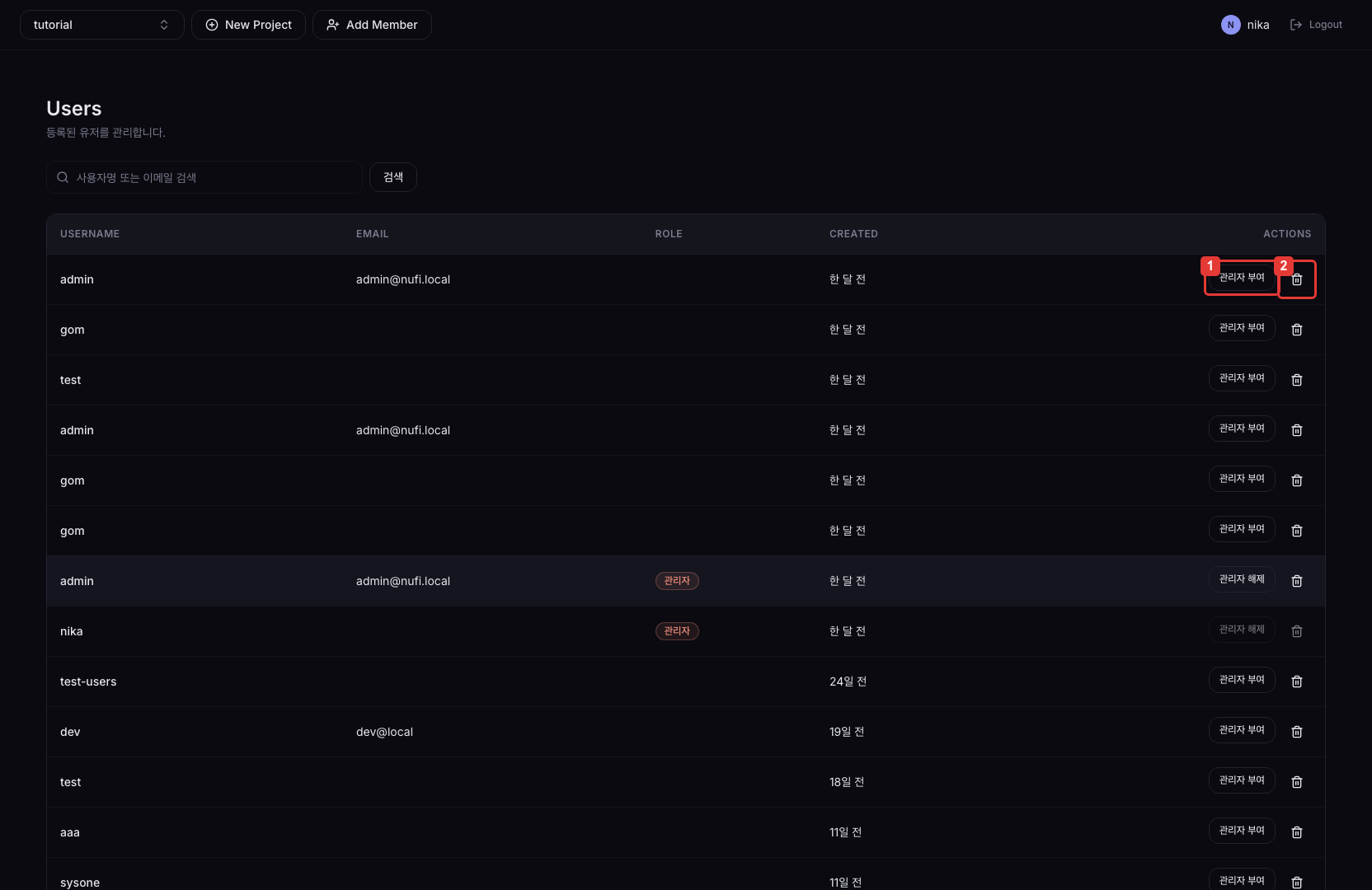
| No. | Description |
|---|---|
| ① | Grants the nufi-admin role to this user. If the user is already an admin, the button shows as Revoke admin, and clicking it removes the role. |
| ② | Deletes the user account. A confirmation dialog appears before deletion. |
Columns
| Column | Description |
|---|---|
| Username | User login ID |
| User email address | |
| Role | Current role (nufi-admin or regular user) |
| Created | Account creation time |
Delete users carefully
When you delete a user, they are forcibly removed from any resources they own (project memberships, etc.). Before deletion, check whether the user is the last member of any project.