StorageClass
Administrators can register, view, and delete StorageClasses directly from the dashboard UI, and designate the Default StorageClass shown as the selection list on the volume creation form.
This menu appears only for accounts that have the nufi-admin role.
StorageClass list
Click Admin > StorageClass in the left sidebar.
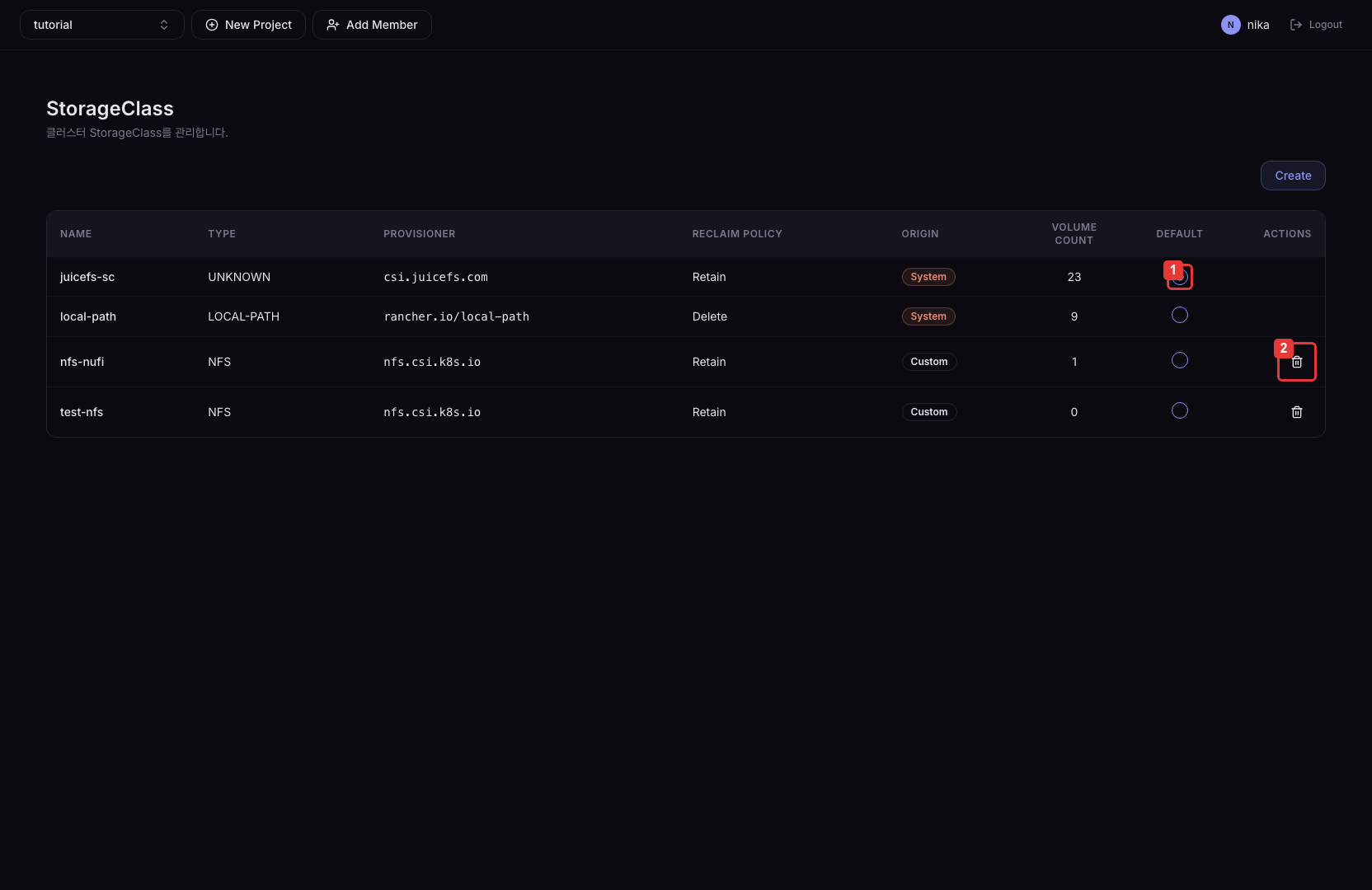
| No. | Description |
|---|---|
| ① | Designate this Custom SC as the default StorageClass |
| ② | Delete this Custom SC. System SCs and the SC currently set as default cannot be deleted. |
Columns
| Column | Description |
|---|---|
| Name | StorageClass name |
| Type | Storage type (NFS / Local Path, etc.) |
| Provisioner | Provisioner name |
| Reclaim Policy | How a PV is handled when released (Retain / Delete) |
| Origin | System-provided SC (System) or admin-added SC (Custom) badge |
| VolumeCount | Number of Volumes created from this StorageClass |
| Default | Default StorageClass badge |
A StorageClass cannot be modified after registration. To change it, delete and re-register.
Register a StorageClass
Click the Create button on the list page.
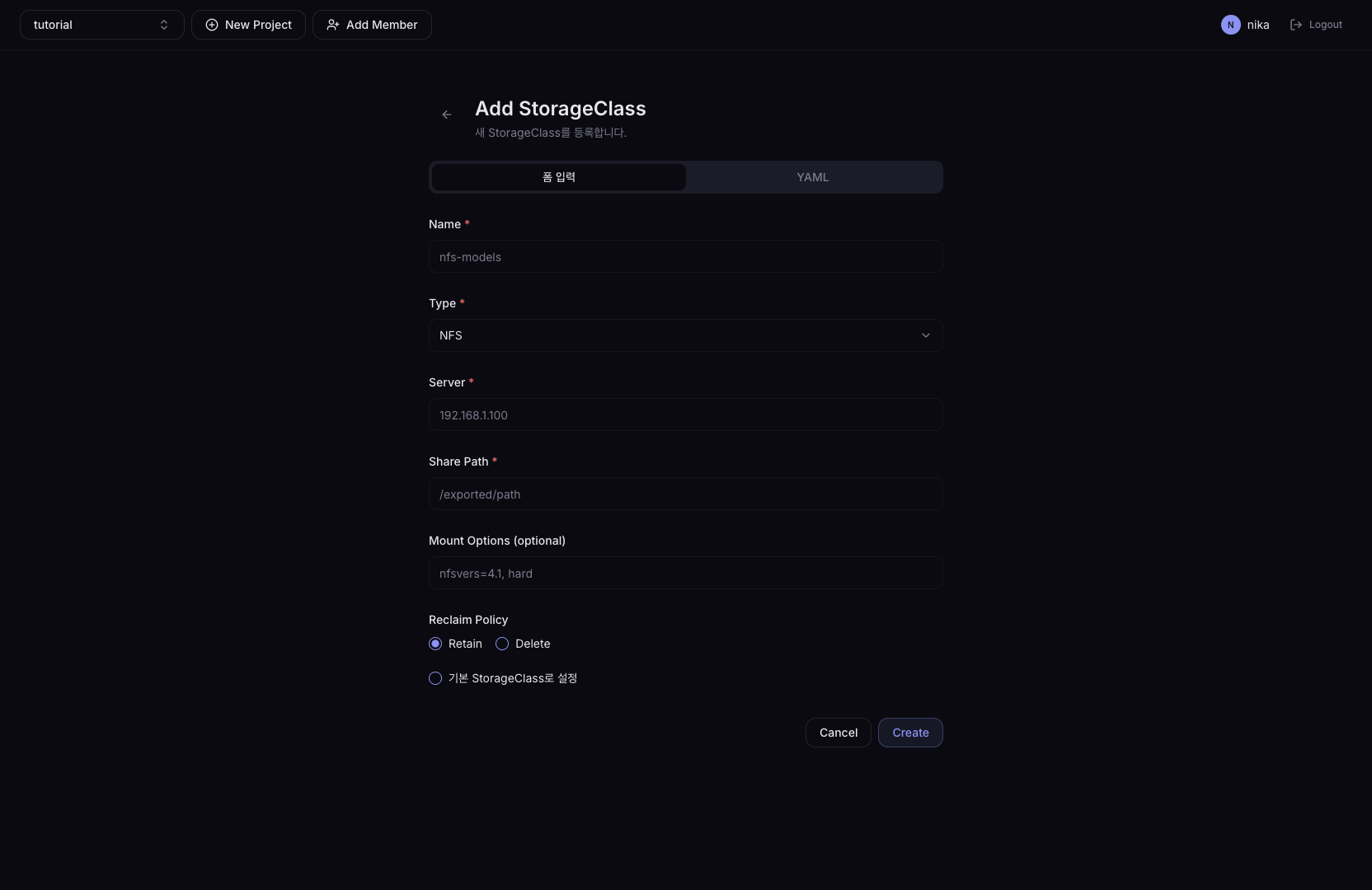
The registration page supports two modes: Form mode and YAML mode. Switch between them using the tabs at the top.
Form mode
| Field | Description |
|---|---|
| Name | StorageClass name (lowercase, digits, hyphens) |
| Type | Storage type (NFS / Local Path) |
| Reclaim Policy | How data is handled when a PV is released. Retain: preserves data even after the volume is deleted. Recommended for production. Delete: data is deleted together when the volume is deleted. Suitable for test environments. |
| Set as default StorageClass | When checked, set as the default selection on the volume creation form |
When Type is NFS
| Field | Description |
|---|---|
| Server | NFS server address (e.g., 192.168.1.100) |
| Share Path | NFS share path (e.g., /data/shared) |
When Type is Local Path
| Field | Description |
|---|---|
| Node Path | Local directory path on the node (e.g., /mnt/local-storage) |
YAML mode
Enter the StorageClass manifest directly in YAML. Use this when you need a custom Provisioner other than NFS / Local Path, or when you need to set advanced parameters such as mountOptions or allowVolumeExpansion.
apiVersion: storage.k8s.io/v1
kind: StorageClass
metadata:
  name: custom-sc
provisioner: example.com/my-provisioner
reclaimPolicy: Retain
allowVolumeExpansion: true
parameters:
  type: ssd
Integration with the volume creation form
Registered StorageClasses appear automatically in the Storage Class dropdown on the Volumes > Create page. If you select an SC with type NFS or Local Path, an additional Mount Path input field for static provisioning appears.